Sunday, 10 September 2017

5 COMMON MISTAKES BLOGGERS MAKE AND HOW TO FIX THEM RIGHT AWAY

I know it’s exciting to start a new blog. But, if you are too excited that’s when you might end up making some mistakes. If you are starting a website using WordPress then you have tons of free themes, widgets, and plugins available. But, choosing from this many might land you in risk of getting caught in the blogging blunder trap-having too many “bells and whistles” and forgetting about what’s important: Your readers.
So in this article, I will behigh send t few tips to avoid yourself from doing any more blogging mistakes.

Here are some common mistakes and simple fixes for them.

Mistake 1: Thinking You can do everything on your own
Great blogging platforms like WordPress, Blogger, ettc., lets you create your own site without any coding knowledge. If you are a blogger blogging just for the sake of sharing the knowledge and not interested in making money from your blog, then you can go to design a blog on your own. But if you are planning to monetize your blog and earn money out of it then: unless you are tech savvy and have some basics knowledge of HTML, CSS and web designing I recommend you to hire someone who can make your job simpler.
The advantages of hiring some one are:
You can save your precious time. Can expect good designed and responsive website. You can expect good SEO results since your website will be optimized. There are sites like Upwork.com, Dribble.com, Project4Hire.com from where you can hire high-end web designers to develop your stunning blog.

Mistake 2: Not Investing in Self-hosted site.
Before you start building your blog, one of the most important decisions you should make is whether to choose a free hosting of self- hosting for your site.
Let’s see why a self-hosted site is far better than a free hosted site.
1.Website address: I have a self-hosted website on WordPress with URL http://niftyslash.com. If free hosting was my choice then the URL would have been http://niftyslash.wordpress.com
2.Control: If you have a self-hosted site then you can use WordPress.org where you can have full control on themes, plugins, and SEO of your website.
3.Monetization: Free platforms generally limit your options when it comes to making money with advertising and affiliate marketing. Whereas self- hosted platforms don’t. But if you are not ready to pay for hosting then you can go free hosting which is fully free.

Mistake 3: Using bad SEO Strategies.
SEO is vital to any successful blogging
campaign.Therefore it should be implemented in the right manner. There are many mistakes you can make when trying to rank in search results, but let’s go over one of the most damaging blogging mistakes … Keyword Stuffing.
Think you want to rank for a particular keyword and use that keyword for few hundreds of times. Won’t it be difficult for visitors to read your content? Of course yes. This is where search engines are becoming smarter and are able to find out and penalize the websites involved in keyword stuffing.
Solution: Unfortunately, there are many bloggers out there who think they should focus first on writing for search engines before their audience. This is the wrong approach – in fact, it’s backwards.

There are few SEO practices that are too good for ncreasing your website’s ranking. I highly recommend you to go through this article and get know about best SEO practices that can benefit you.

Mistake 4: Not creating awesome
Headlines.
According to Worldometers.info, there were 4,538,982 blogs as of June 2017.
Since most of these blogs produce new articles there is a huge number of articles on the internet.
Do you think all those blog posts gets same clicks? NO.
On average, 8 out of 10 people will read headline copy, but only 2 out of 10 will click on your article. Why are only 2 headlines getting clicks? Why not all 8?
It’s because of boring headlines. A powerful heading has the potential of converting a visitors to a reader and then probably to a buyer/ subscriber.
Solution: Try impressing people with first
impressions because “First impressions last”.

Mistake 5: Not reaching your customers.
Just creating a good content and hoping that post will go viral will do you no good.
You should market your content through Content marketing. Some people have so much success with their content marketing strategies that they have hundreds of thousands of readers. Of course, great content is a big part of the equation, but the other often overlooked area of content marketing is a content promotion. Most of the professional bloggers spend 20 percent of their time developing the content and rest 80 percent of the time on promoting the content.

There are many ways, which you can make use to grow your audience:
1. Social media marketing.
2. Content marketing.
3. Using Forums.
Since there are huge people on social media and forums, you can try to reach a specific group of audience who are interested in your niche. It’s all about building confidence and brand value for
your website.

Final thoughts on blogging mistakes.
We live in a world full of cheap information. At the push of a button, we can get our eyes on for more ideas, blog posts, and news stories than we could ever possibly consume. Blogging can be complicated if you commit any of the above mistakes and never realize at the earlier stages. I have tried covering all the important blogging mistakes in this article.

I hope this article is helpful! It can also be helpful to a friend, do well to share with them! 
Share:

Friday, 8 September 2017

HOW TO TURN ON AND OFF YOUR ANDROID PHONE WITHOUT THE POWER BUTTON

Android phones has been perfectly known for there best huge amount of apps and customization that enables you take full control of your device thereby tweaking it the way you desire. This feature is certainty what made Android phones stand out in the mobile market today.
So In this article I am going to show you how to Turn on your android phone without using the power button. Its certainly time to "Forget the power button and make use of gravity screen to turn on your device". Mostly at times, I do prefer using this method since its easy, efficient and professional thereby sustaining more life to my power button. If your power button has faded out or is no longer working properly due to one reason or the other, then follow this guide and forget the damned power button. We are going to use an android app called Gravity Screen as mentioned earlier. The app enables you to turn ON and OFF your Android using motion.


KEY FEATURES OF GRAVITY SCREEN
Pocket Sensor: Turns the screen off if your phone is in your pocket.
Table Sensor: Detects your phone is lying on a table and turn it off if not in use.
Turn Screen On by Motion: If the screen is off and it's facing up the device can be woken up by moving it.
Keep Screen On by Motion: It keeps the screen on while you are watching the screen. It relies on the small movements of your hand while holding the device.
Smart Lock support: It's a workaround to make the Smart lock feature work fine on devices with Lollipop.
Locale plug-in for: Tasker, Llama and others

HOW IT WORKS...
Gravity screen turns automatically the screen off when you put your phone into your pocket or onto a table. And turns the screen on when you take it out or up. No need to touch any button and you are ready to go. It's especially helpful if your lock key is hard to reach or the power button is broken.

HOW TO USE GRAVITY SCREEN FOR ANDROID
1. Download the Gravity screen app for Android here
2. Install the app and open it then activate the Gravity screen (Screenshot above).
3. Once taken to the next page, tap on OFF to turn the app ON then setup up the app in your desirable way.

HOW TO UNINSTALL GRAVITY SCREEN
Please, use the Uninstall button in the app. Due to Android restriction the app cannot be uninstalled.
In conclusion the gravity box app those not drain battery and also its more efficient and works great on both rooted and non-rooted Android device.


Share:

Thursday, 7 September 2017

9MOBILE CHATPACK FREE BROWSING CHEAT BLAZING ON ANONYTUN VPN

Anonytun Free browsing on 9mobile stopped working about a day or two ago but this latest Chatpak cheat is affordable for browsing and downloads as it offers at least 2GB of data for just 600 Naira monthly (150 for 500MB per week). Glo free browsing cheat is available and requires subscription to Facebook flex to get internet connectivity. 9Mobile Chatpak is a social bundle from Smartpak data bundle plan which works only on social media, but can power all apps on your android mobile phone by setting up Anonytun VPN apk app.
ChatPak works on all devices - android, iPhone, blackberry and windows, but to use it to powers all apps, you need an application that is only availability in android version, hence this cheat is only for android users. I always advice cheat lovers to get android device because most free browsing cheat are only available for android users.

What Is Needed For Mobile ChatPak Anonytun Cheat?
  • Android mobile phone
  • 9Mobile / etisalat SIM
  • 150 Naira airtime to subscribe to chatpak
  • Anonytun VPN app
Anonytun Setting for 9mobile Chat Pack Cheat
  • Download Anonytun VPN app
  • Recharge your 9Mobile SIM with 150 naira, then subscribe to 9Mobile chatpak by dailing *200*3*3*1*2#
  • Install and open the Anonytun VPN you downloaded and set it as follows
  • Open the app and Tap on STEALTH SETTINGS
  • Toggle Stealth Tunnel ON
  • Connection Protocol, select HTTP

  • Connection Port, input 8081
  • Toggle Custom TCP/HTTP Headers, ON
  • Tap on EDIT CUSTOM TCP/HTTP HEADERS
  • URL/HOST, input  Viber.com or cdn.whatsapp.net
  • Request Method, select POST
  • Injection Method, input, Normal
  • Extra Headers, tick KEEP ALIVE and USER AGENT
  • Tap on GENERATE

Save and connect to flex your browsing and heavy downloads!!
Any doubts? Use the comment box. Don't forget to share with your friends!
Share:

Monday, 4 September 2017

5 SIGNS YOU'RE LIKELY SUFFERING FROM 'NOMOPHOBIA'

               
There is need to examine the number of hours you spend without need for your phone. Advancement in technology has impacted greatly on our ways of life. This can be observed from our attatchments to modern technological gadgets. 
For many, especially the Millennial, life does not exist without technology. Thus, most people have developed a lifestyle that cannot be divorced from their mobile phone.
This psychological distortion is known as"Nomophobia” or ‘no mobile phone phobia’.
Nomophobia is described as the fear of being without or unable to access one’s mobile phone. This habit has a propensity to negatively impact all human endeavours – work, relationship and social interaction.
“People with Nomophobia actually experience feelings of fear, anxiety and some people actually report panic just at the thought of not having their phone,” said Dr Elizabeth Waterman, a clinical psychologist.
These symptoms show you may be suffering from “Nomophobia”, but you did not know.
1. Feeling extremely anxious without your phone                 If you cannot stay a few minutes away from your mobile device, then it is a sign you may be suffering from this mobile phone addiction.
Psychological instability due to not having your mobile is a symptom of Nomophobia.
2. Impulsively checking your phone for notification(s)                      Keeping a constant watch of the phone for notification(s) is a symptom of Nomophobia. Please note that this does not extend to a situation you are expecting an urgent message from someone.
3.  Having a fear of running out of battery                     Moving around with your phone charger, and always looking for power plug are signs you may be developing addictions to your mobile device.
4.   Sleeping with your phone                       When your phone is always under your pillow or a hand stretch away while sleeping, then you may be suffering from Nomophobia.    
5.  Phone check as first daily action                       If your phone is the first thing you lay your fingers on or use whenever you get up from the bed then you're also suffering from Nomophobia!
These signs are rampant within the youths of this modern age. The use of mobile is way very important but when you make it your lord or your most valuable asset, then it becomes a problem.
Do well to share with your family and friends and always check HalezisTechs for daily updates. You can also subscribe to get our updates on your mail as they drop! 
Share:

HOW TO SEE THE PASSWORDS OF ALL WIFI NETWORKS ON YOUR ANDROID PHONES

Ever been in an annoying situation where something happens and the WiFi network(s) you previously connected on your mobile to doesn’t go through anymore hence the need to reconnect. Like that isn’t annoying enough, you don’t seem to remember the password to the network. Now that’s more annoying.
Another scenario is when a friend requests for the password of the WiFi network you are connected to and you tell him you don’t know (which is true actually) but he doesn’t believe you. Save yourself the hassles and stress of wracking your brain to remember the password to previously connected WiFi networks on your Android phone using the trick below;

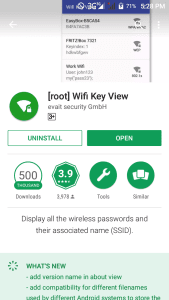
Downland the "WiFi Key View" App
First off, download and install the “WiFi Key View” application from the Google Play Store or get Apk here
NOTE: To enjoy the full functionalities of the Wifi Key View app, you must first root your smartphone or ensure your smart phone is rooted. But before you root your Android device read this

Grant the App necessary permission


After installation, the root app will display a prompt asking if you want to allow or deny the WiFi Key View app root access.
Click Allow to grant the app root access as it is needed to seeing your WiFi networks passwords.
Basically, the app requires root access so it can obtain the list of network names and their respective password from the location where it is being saved in your device.

Launch the  WiFi Key View App

Launch the WiFi Key View application and on the app dashboard, it automatically displays all WiFi networks you have connected to in the past with the network names on top and the password below.
Also, at the top right corner of the app, you can simply do a network search if you have numerous networks on your list or if you remember the name of the WiFi network you seek its password. This is easier and faster in my opinion.

Other Tips

  • On the app dashboard, hold any WiFi network and a pop up menu appears.
                     
  • From the pop up menu, click either of the first two options to copy the network’s password to your clipboard.
  • Click the third option to create a bar code for the password
  • And the last option allows you share the password to your friends via SMS, WhatsApp, Facebook, Messenger, email, and many other

    Don't forget to use the comment button if you're confused in any way. Also share with your friends and always check back for regular updates.
    Share:

    Saturday, 2 September 2017

    WAYS TO REDUCE YOUR MOBILE DATA USAGE ON ANDROID PHONES


    If you are an Android user and you don’t take cellular data usage for granted, here are the tips you can follow to reduce the data consumption of your mobile device.
    1. Turn on data compression on Chrome!
    Most of you are probably Android supporters. And hence, you are also likely Chrome users. Did you know Google’s popular browser has a feature that can reduce data consumption significantly? Google states this option should save you about 50% in data. All without you even feeling a difference. In fact, you may feel some changes – browsing will get faster!
    What Chrome’s data compression option does is route all your web browsing through Google’s servers. The Search Giant then takes the website’s data, compresses it, optimizes it for the smaller screen and sends it back to your device.
    All you have to do is open Chrome, tap on the 3-dot menu button and select Settings. Click onData Saver and then toggle the option in the top-right corner. You are done!
    2. Restrict background data
    Some apps just spend too much data, even when the smartphone is not in use. It’s actually one of the greatest features on Android, as background data allows you to keep everything updated and monitored while you are off doing other things. The deal here is that not every app needs to stay active at all times.
    Go into Settings > Data Usage and select the app you want to restrict data for. In the stats you will see two types of data: foreground and background. If you find background data is too high and you don’t need the app to stay active, simple toggle the switch that is labeled as “Restrict app background data”.
    3. Update apps only via WiFi
    This one is a bit of an obvious one for many of us, but plenty of users out there continue updating their applications over cellular connections. This is OK if you choose to do it, but how many times have you noticed all your apps were auto-updated without your consent, spending all them precious GBs? Hopefully not too often, but if this is an issue, we can show you how to stop it from happening again.
    Just open the Google Play Store and tap on the hamburger menu button (three horizontal lines parallel to each other). Hit the Settings option and then select the “Auto-update apps” button. Hit “Auto-update apps over WiFi only”. 
    4. Keep an eye on your account syncing settings
    We love our active syncing and push notifications, but having these also means the phone has to keep checking servers for any new content. You must also realize many apps and services are set to keep sync by default, and often we don’t even use them!
    This is why you should keep an eye on your account syncing options. Just go to Settings > Accounts. For the sake of showcasing useless services, let’s just jump into your Google accounts and select your most used one. In my case, all toggles are turned on, so I am syncing app data, Calendar, Chrome, Contacts, Docs, Drive, Gmail, Google Fit, Opinion Rewards, Photos, Play Music, Google+, Keep, Slides and many others. Now, I know for a fact I don’t use about 20% of these, so I can turn them off and save myself some precious data! Do the same for other accounts, as well.
    6. Avoid streaming content
    As much as we hate it, it is the awesome stuff that uses up the most data. This includes streaming videos and music, as well as looking through high quality images or GIF files. Try to avoid these at all costs if you really want to take care of your internet usage.
    Now, we know a smartphone is worthless without your media, but there are ways to stay entertained responsibly. Users can opt for storing music and videos locally. If you absolutely must stream, make sure you jump into the settings and set quality at lower rates. Likewise, you can decrease resolution in YouTube and other video streaming apps.
    7. Cache everything, Whenever you can!
    Certain apps allow for storing data locally. These include popular ones like Google Maps and Google Play Music. Make sure you cache as much content as you can while you are on a WiFi network. Then you can go out and enjoy your content without spending any of your precious data.

    Don't forget to share with your friends and keep coming back for regular updates
    Share:

    ADVANTAGES AND DISADVANTAGES OF ROOTING YOUR ANDROID DEVICE

    I know many of you never thought of the disadvantage of rooting rooting your Android phone, i know the advantage is good and seems to cover some of this disadvantage, it will be Good you know the disadvantage and addup of some of the advantage of rooting that Android powered smartphone. After reading this you may or may not want to root that android phone. Because i will be comprehensively explaining the advantage and disadvantage of rooting your android phones. Oops, forgive my bad, do you know what rooting is? If not, before we go into the advantage and disadvantage of it let's take a quick glance for newbies sake the meaning of rooting.
    According to Wikipedia.
    “Rooting is the process of allowing users of smartphones, tablets and other devices running the Android mobile operating system to attain privileged control (known as root access) over various Android subsystems. As Android uses the Linux kernel, rooting an Android device gives similar access to administrative ( superuser) permissions as on Linux or any other Unix-like operating system such as FreeBSDor OSX. Rooting is often performed with the goal of overcoming limitations that carriers and hardware manufacturers put on some devices. Thus, rooting gives the ability (or permission) to alter or replace system applications and settings, run specialized applications(“apps”) that require administrator-level permissions, or perform other operations that are otherwise inaccessible to a normal Android user. On Android, rooting can also facilitate the complete removal and replacement of the device’s operating system, usually with a more recent release of its current operating system.”
    With this small knowledge about rooting, let's take a quick look at the Disadvantage and Advantage.

    Disadvantage of Rooting Your Android Phone

    Hard brick: 
    This is a popular android problem. Yeah at the Process of rooting android phone it's very risky and has to be done with very caution. As, one wrong step in rooting your android phone might cause hard brick. That’s why newbies are not recommended to root their android phone.
    Data loss: 
    In the process of rooting android phone some steps like hard resetting the whole phone is included sometime, i'll recommend you to take backup atleast so that if you lost your data in process of rooting your android phone, you can get it back anytime.
    Warranty killed 
    When you root your android phone, you'll lost your warranty. Though, you can unroot your android mobile anytime to get your warranty back.
    Random reboots: 
    This happends to by my personal experience, When I was installing a custom ROM in my android phone I was facing random rebots and apps crashes as well.
    Privacy 
    lost as well, as third party ROMS and apps can misuse of root permissions. As, process of rooting your android phone includes adding of third party apps which is a bit risky.

    Advantages Of Rooting Your Android Phone

    Rooting your android mobile has several advantages, but here we are listing some of the best advantages, you will get after rooting your android phone. So, if you're ready to root your android phone, then you must be aware of disadvantages and advantages of rooting android phone.​ So, before rooting your android phone make sure that you have read both advantages and disadvantages.
    ​Access all files of your Phone: 
    Whether they are present in the root directory of your storage or enywhere else, by giving root permissions, you can Edit or Delete any system file. Increase your phone performance by over clockocking it, by changing the frequency of CPU of your android mobile, by which you can easily speed up your android phone without any problem.
    Increase battery life
    Bet you've never heared of this right? Yes rooting you android phones increases the battery life,
    How do i do this?
    Just by under clocking CPU of your android phone, which will let your phone battery for long time.
    Change Custom rom 
    Can install the several custom rom to change feel of your android version like CyanogenModor AOSP or Eye Candy ROM MIUI which can change the feel off whole android device usage.
    Upgrade 
    By rooting your phone you create a way so you can upgrade android version of your mobile using custom roms like CM11 or CM12 or any other rom.
    Share:

    WAYS TO MAKE YOUR SMARTPHONE BATTERY LAST LONGER

    If your phone battery is not lasting long, then you need to read this piece to educate yourself on how to manage your phone judiciously.
    All batteries have an expiry date. Same is true for smartphones’ batteries. However, the way you use your smartphone also goes a long way in deciding the longevity of your device’s battery.
    As such, there are few phone charging habits you can implement in your daily life that can increase the lifespan of your battery. According to Jumia Travel, here are seven tips on how to charge your smartphone and make its battery last longer.

    (1) Fast chargers are not always the best option
    Using a fast charger might not be the best thing for your battery’s health. This process involves a higher voltage to be sent to the phone’s battery which results in a rapid rise in temperature. Your phone may even explode as a result of this.
    (2) Charge your phone with its own charger
    Always charge your phone with its own charger. Unlike laptops, smartphones use a universal charging interface. However, if the charger you use does not match the original, it will affect battery performance.
    (3) Remove protective case while charging
    You might have noticed while your phone is charging, it becomes slightly warm. So, make sure to remove the phone’s protective case while charging. This can act as a barrier and slow down the heat.
    (4) Don’t use cheap chargers from unknown manufacturers
    Avoid cheap chargers from unknown manufacturers. They do not include any safety advice to protect against overcharging. Know that adapter failure could permanently damage both your battery and phone.
    (5) Never leave your phone to charge overnight
    There are many people who leave their phone plugged in overnight for charging. You just need to stop this habit. Charging overnight affects battery longevity, and it also makes your smartphone overheat.
    (6) Always charge up to 80 per cent
    Eighty per cent charge is enough for a day, and it is good for your overall battery lifespan. Crossing the 80 per cent mark can make your battery to overheat, thereby affecting the battery’s life.
    (7) Avoid charging the phone repeatedly
    Smartphones should not be charged repeatedly. The rule of thumb should be not to charge until the phone’s battery is up to 20 per cent.
    #Takeaway

    Six smartphone battery myths you should stop believing
    Batteries are one of the most integral parts of any smartphone. A clumsy battery can break down a smartphone like nothing else. But alas, the world of batteries is overflowing with myths, according to www.guidingtech.com.
    I can leave the charger on forever
    Well, practically yes, you can. If you don’t love your cell phone at all or you change your devices too often. But if you care for a longer life of your battery, then the best way to charge is not going over 80 or below 10.
    Every battery comes with a fixed amount of cycles and these cycles tend to wear off the more you charge your phone.
    In fact, charging your battery to 80 per cent on a regular basis is shown to increase its life by 200 per cent So, do make sure that you maintain the sweet spot of the battery — 10 per cent and 80 per cent, with an occasional zero per cent discharge to calibrate the battery life.
    Closing apps will save battery
    If you are one who swears by the mantra that closing apps will improve battery (and performance), then you are in for some news.
    The fact is closing apps does more harm than good. Chances are that you might actually end up draining more battery juice in the process.
    Closing an app suddenly might result in losing data. Also if the phone needs to restart the app again, that will require more CPU resources and hence, more battery.
    Letting the battery drain to zero per cent every day
    This again is a tale from the ancient days of Nickel Cadmium batteries of the 80-90s. Nickel cadmium batteries had the memory effect, which essentially gave rise to this myth.
    After these batteries were recharged for a couple of times, they would forget their full capacity and eventually weren’t able to hold the charge. The discharging was done to reset the ‘memory’.
    The Lithium-ion batteries used nowadays have a smarter way of power management. It counts a cycle when you have used 100 per cent of the battery in multiple uses. For instance, if you used 40 per cent today, and 20 per cent on two consecutive days, then only it would call for one cycle.
    4G drains the battery faster
    It’s true that radio signal consumes lesser resource than cellular data. However, that should never be the cause of your battery life going for a dive. If you have a good quality SIM from a reliable operator, then it shouldn’t be the cause of a meltdown.
    A 5000 mAh power bank will yield two full charges
    Often, it’s assumed that a 5000 mAh power bank will be able to yield two full charges for your 2500 mAh battery. How did we arrive at the conclusion? Simple, just dividing the capacity by the full power.
    But that’s not how simple as it seems. The catch is the voltage at which it charges. The power rating of a power bank is calculated at 3.7 volts whereas the phone charges at 5 volts.
    Only when a step-down in the voltage is made that the right number of charge cycles can be determined. So, the next time you are on a lookout for a power bank, do make sure to do the math.
    Charging through a laptop may damage the battery
    Again a misconception, charging a phone through a laptop will only yield a slower charge and nothing more. This won’t harm the battery in any way.
    Share:

    Friday, 1 September 2017

    HOW TO USE DROPBOX WITH AN ANDROID PHONE

    Dropbox is an awesome application for sharing your files with all your computers and devices. Today we take a look at using Dropbox on your Android phone.
    If having access to your most important files is critical to you, even when you are on the go, Dropbox is your answer. Not only can it sync documents between all your computers whether they be Windows, Mac, or Linux, it also allows you acces using your iPhone, iPod Touch, or Android phone.

    Download and Setup

    Download Dropbox from Play store or install it here.
    When you open the Dropbox App the first time you’ll be prompted to log into your account, or create an account if your’re a new user.
    Existing users can enter your username and password and select Log in.
    After you log in you’ll see all of your Dropbox folders and files.
    Tap to open any folder and open your folders, files, photos, videos, etc.

    Sharing Files

    You can very easily share any of your Dropbox documents by email, Twitter, Facebook, or IM using the installed apps on your phone. To share a file, press and hold on the file. When the options appear, select Share.
    Next you’ll choose whether to Share a link or Share this file. Here we will share a link.
    Next you’ll be prompted to choose your delivery method.
    Your recipient will get a link to open and view the file.
    If you select Share this file…
    You will have the option to send the file via email using one of the installed mail clients.

    Uploading Files

    You can upload files to Dropbox directly from your Android phone. Select the Menu button on your phone and choose Upload.
    • You’ll be prompted to select the type of file you want to upload. For our example, we’ll select a video we’ve previously shot and stored on the device.
    • Selecting picture or video will take you to the gallery to select the media file and you’ll see a notification that your file is uploading.
    Now your file is accessible from all your devices that have Dropbox installed.


    Create and Save Documents from the the Dropbox App

    You can actually create a new document, take a photo, or a video and save it without leaving the app itself. Press the Menu button on your device and select New.
    • Next you’ll be prompted to select the type of document you’d like to create.
    When you're done creating, Your document will be immediately uploaded to Dropbox


    Search

    Looking for a specific file by can’t seem to locate it? Try Search. Press the Menu button and select Search.
    Type in a search term and get the results.

    Settings

    The Dropbox settings (Press Menu and select Settings) will display your current username, the amount of space used in your Dropbox account and the current App version number. You can unlink your device from Dropbox if you no longer with to use it, and even watch a short introductory video about Dropbox

    Conclusion

    The Dropbox App is a fantastic way to access and share your vital documents anytime you need them right from your Android phone. It’s free, and easy to use.

    Curled from www.howtogeek.com
    Share:

    Wednesday, 30 August 2017

    HOW TO DELETE GOOGLE'S COPY OF YOUR ONLINE ACTIVITIES

    Privacy is very dear to most people but what they dont know is that their online activities are recorded and stored by Google on their devices. Google monitors and keeps record of your online activities; websites visited including those sites you may think you alone know about. Google has evolved and its not just a search engine. It is absolutely true that Google may have a complete information on most of the things you do with your device, so if you are one that likes privacy, this will be a helpful tip for you.
    How To See And Delete Everything Google Knows About Your Online Activities.
    • Open any browser on your device and click on this My Activity link to see everything Google have stored about your online activities. You have the option to delete them one by one or leave them for future purposes
    • You can turn it off by heading to Activity Control here before deselecting Web & App Activity, uncheck “Include Chrome browsing history and activity from websites and apps that use Google services”
    • On the same Activity Controls page, users can also disable location tracking, contact and calender storing, Google's activity to  record and store your voice recordings, and YouTube Search and Watch History.
    Share:
    Powered by Blogger.

    Latest Posts

    HALEZIS

    Blogger templates